
Payments
The Payments tab on the session board helps you keep track of who owes what for the night and what you have collected.
Setting the costs
Section titled “Setting the costs”Each session has three costs, set in the session settings (the cog on the board):
| Cost | Applies to |
|---|---|
| Full member cost | Members with the Full membership type |
| Trial member cost | Members on Trial |
| Guest cost | Guests |
Each attendee’s expected cost comes from their membership type. You can change any of the three mid-session in settings, and the Payments tab updates straight away - handy if you decide guests are free tonight, for instance.
The Payments tab
Section titled “The Payments tab”The top of the tab summarises the night:
- Attendee count, broken down into Full, Trial and Guest.
- Total due (everyone’s expected cost added up), total paid, and total outstanding.
Below that, one row per attendee shows their name, membership, session cost, amount paid, balance due (highlighted when something is still owed) and a comments field.
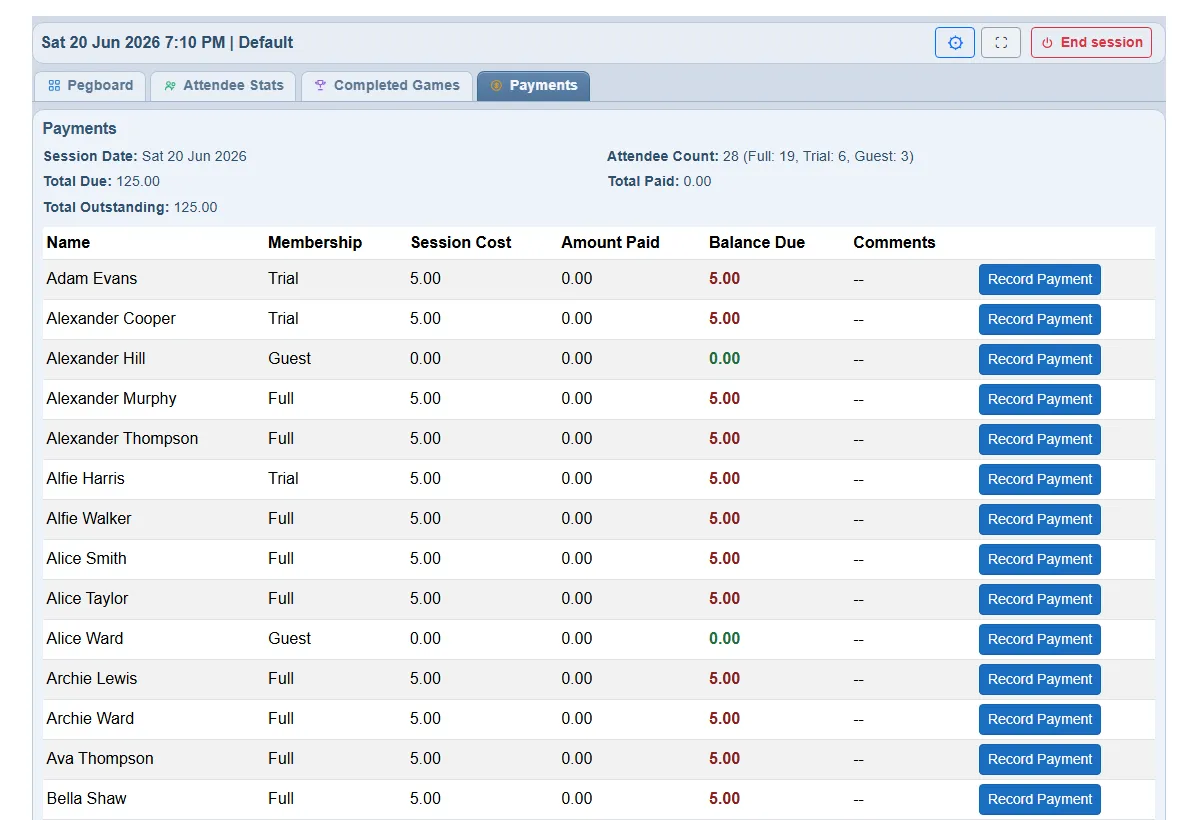
Recording a payment
Section titled “Recording a payment”Click Record Payment on an attendee’s row. A small dialog shows what they are expected to pay and lets you enter:
- Amount paid - what you actually collected.
- Comment - optional, but required if the amount differs from the expected cost (so there is always a note explaining a short or over payment). It is a free-text field, so it is also where you would jot “cash”, “cheque”, “paid next week” and the like.
Save, and the row updates with the new amount and balance. A few things to know:
- Each save replaces the previous amount and comment - it is a single figure per attendee, not a running ledger of part-payments.
- You can re-open and correct an entry at any time.
- There is no “mark everyone paid” button - payments are recorded one attendee at a time.
- ePegboard does not record a payment method or hold negative amounts; use the comment for anything unusual.
Across sessions: the payment summary
Section titled “Across sessions: the payment summary”For the bigger picture, Reports → Payment Summary totals payments across sessions, with a date range you can set (last month, quarter, year to date, or custom). Two views:
- By session - expected, paid and outstanding for each session.
- By member - how much each member was expected to pay, has paid, and still owes across the period.
You can export the summary to CSV for your own accounts or reconciliation.
When the session ends
Section titled “When the session ends”Payment records are kept when you end a session, alongside the games and stats. If you spot a mistake afterwards, an organiser with admin rights can still correct an entry.
Who can do what
Section titled “Who can do what”| Action | Owner | Admin | Standard |
|---|---|---|---|
| View the Payments tab and summary | Yes | Yes | Yes |
| Set costs and record payments | Yes | Yes | No |
That is about who is signed in. On a shared tablet running kiosk mode, recording a payment counts as running the session rather than as an admin action, so whoever is at the tablet can record and edit payments while the Payments tab is showing - it is not held back by the organiser PIN. Turn Show Payments tab off for that session profile if you would rather it were organiser-only.