
The game picker
The picker chooses four players for the next court so the games are worth playing and the night feels fair. It suggests a game in well under a second, and you stay in charge: take the suggestion as-is, swap players around, lock someone in, or start from scratch.
Using the picker during a club night
Section titled “Using the picker during a club night”When a court is free, the Next Game Prep panel shows the picker’s suggested game - two teams of two, with a par score for how close it should be. Take it as-is or adjust it:
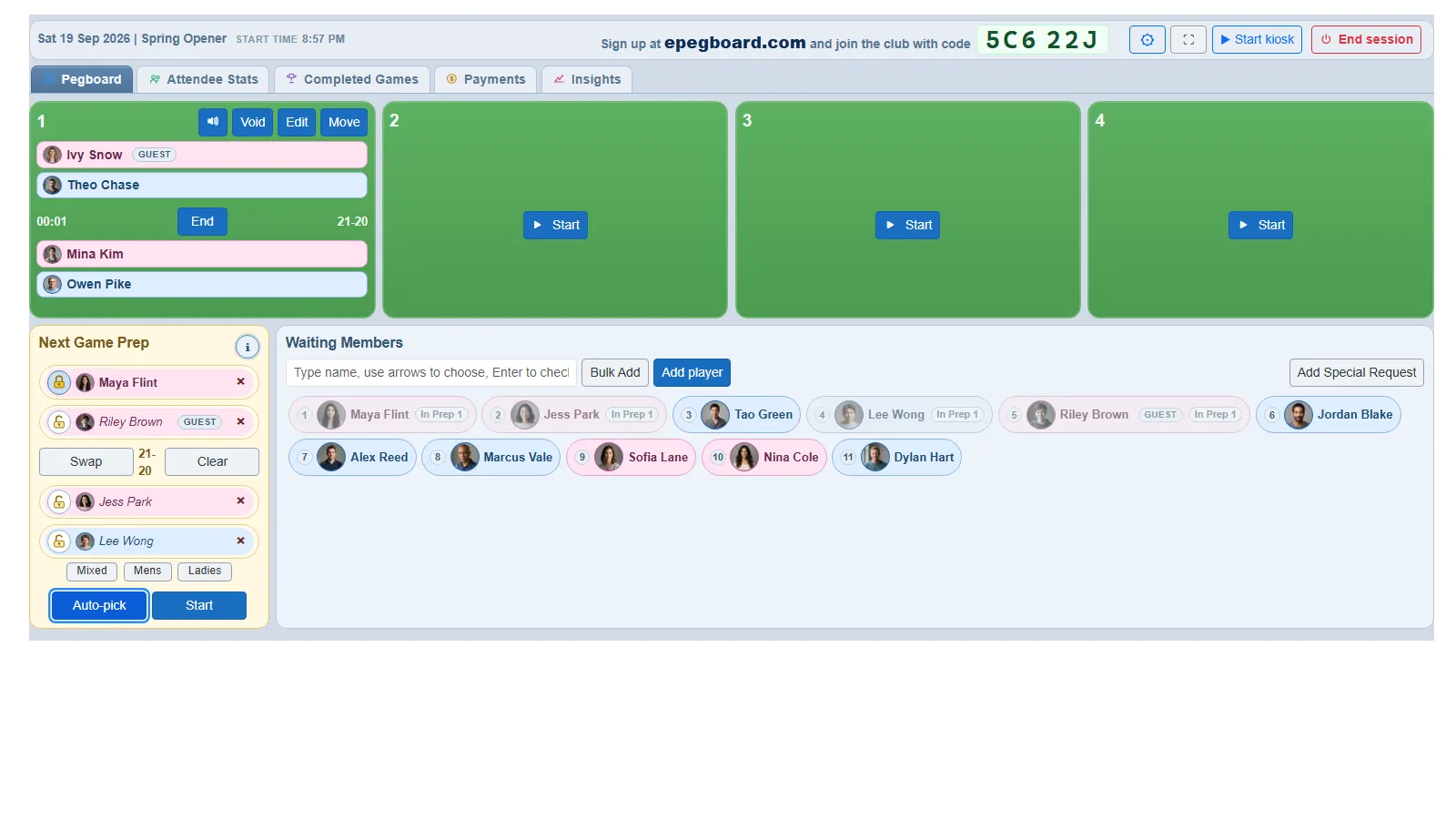 The Next Game Prep panel shows the picker’s suggestion for the next court. Adjust it if you want, or just Start.
- Generate a suggestion. A free court fills automatically. Tap Auto-pick to build a fresh suggestion from the current queue at any time.
- Skip the review. Tap Pick and Start on a free court and the picker chooses the four and puts them on in one action, without staging the game here first. That is the fully automated way to run a night - see Choose how hands-on you want to be.
- Swap a player. Tap a player’s name to open a Swap with list and choose someone from the queue. Tap Swap to switch the two pairs around. Tap the × on a player to take them out, or tap an empty slot to add one.
- Lock a player in. Tap the lock icon on a player to keep them in place while you re-pick the rest - handy when someone has waited and you want them on next.
- Set the format. Use the Mixed, Mens and Ladies chips to ask for that kind of game.
- Start over. Clear empties the panel so you can build a game by hand.
- Start the game. When you are happy, tap Start. The four players move onto the court and the game goes live.
With more than one court free, the picker still knows the whole room, so it will not strand someone who is needed elsewhere.
See why a game was suggested
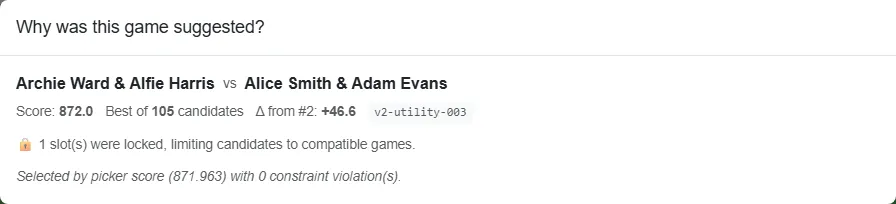
Section titled “See why a game was suggested”Tap the information icon on the panel to open Why was this game suggested? - which players were waiting longest, how the teams balance, and why this combination came out ahead of the others. Anyone watching the board can open it, so there are no “the system got it wrong” debates without the evidence in front of you. If a suggestion still looks off, the same panel has a flag to send us feedback.
Settings
Section titled “Settings”The settings cog on the session board opens that session’s picking settings; the same settings live on your saved profile, so you can set them once for every night (see Set up your session profiles). Sensible defaults work for most clubs; the controls below let you adapt to your room.
Settings open on a section list - Session setup, Game rules, Pricing, Sticky pairs, Auto-pick, Kiosk mode - and show one section at a time. Choose the section you want from the list rather than scrolling for it. (Sticky pairs is listed only where there are players to pair, so it appears on a live session and not on a saved profile.)
Session setup
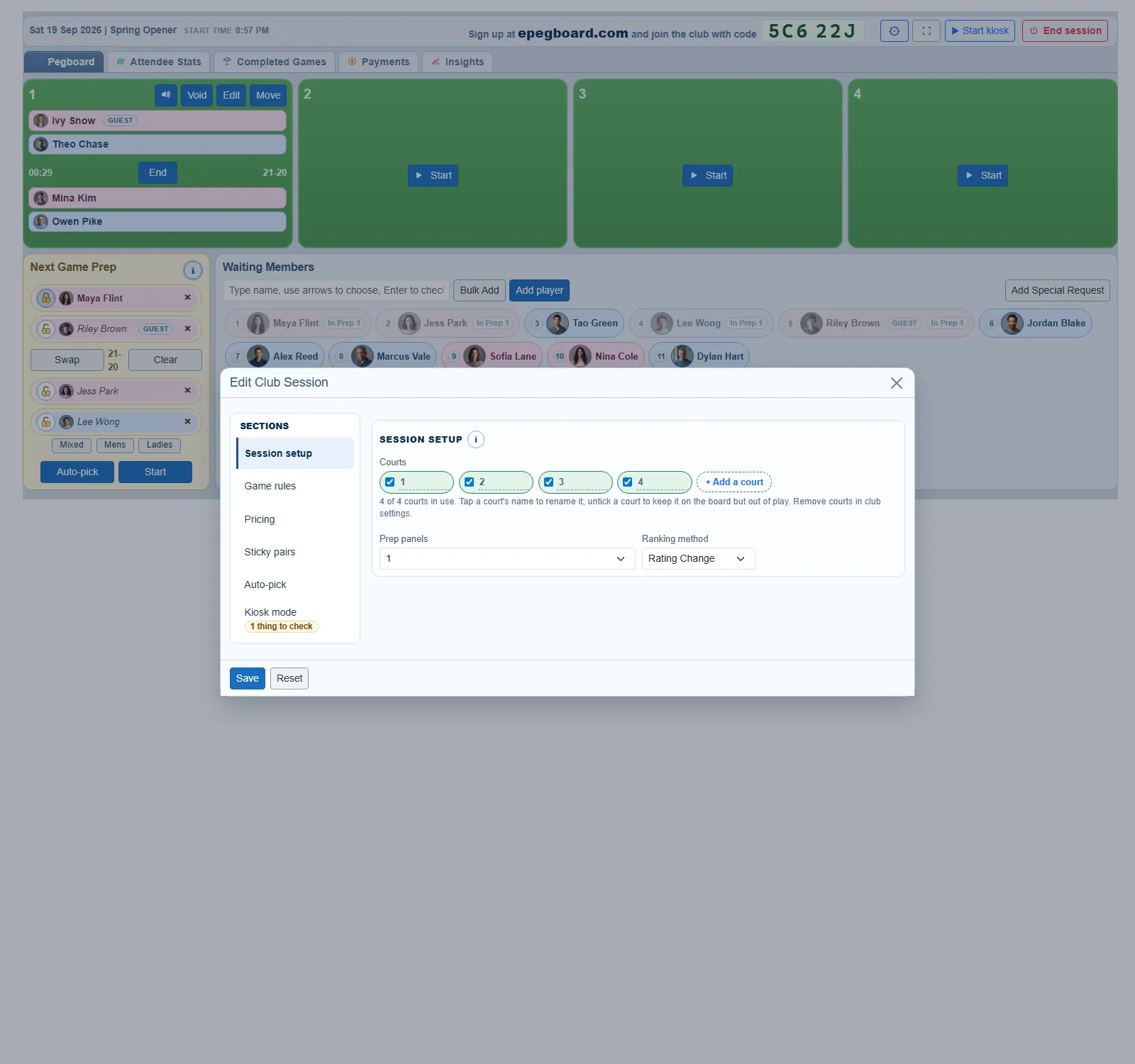
Section titled “Session setup”- Courts. The courts you are playing on, listed one row per court. The list is the count - there is no separate “how many courts” box to keep in step with it, and a line beneath the list reads N of M courts in use.
- Name them how your hall names them. Tap a court’s name to change it. “1”, “3”, “Hall A” - whatever is on the wall, up to 12 characters, and up to 24 courts.
- Add a court with + Add a court. It arrives named with the next number, which you can then change.
- Tick a court in or out of use. Untick one to keep it on the board but out of play - a court that is block-booked, or has lost a light. Untick a court with a game on it and it shows as closing: the game plays out and the court drops out when it finishes. You cannot untick the last court still in use.
- Removing a court is a profile-only action - see Set up your session profiles. During a night, unticking is how you take a court out.
- Prep panels (1, 2 or 3). How many games you stage ahead. One shows only the next game (Next Game Prep). Two adds Game After Next, and three adds Game After That, so an organiser can build the queue ahead while games are still in play. Most clubs want 1. Go higher if your organiser likes to stay ahead of the queue, or you have very fast games.
- Ranking method (Win % or Rating Change). Drives how the Attendees view orders the night-end leaderboard. Win % is the classic “most wins on top”. Rating Change rewards players who beat the system’s expectations - a player who lost three out of four but those losses were to much stronger pairs may rank higher than the player who won three out of four against weaker pairs.
Sticky pairs
Section titled “Sticky pairs”Most nights you want the picker to mix everyone around. Sometimes you do not: a pair who always play together, a parent and child, a coach pairing two players for the evening, or a newcomer you want kept alongside a regular. A sticky pair locks two players as partners for that session - whenever both are in a game, they are on the same team.
Sticky pairs are set on the night, not on a profile - they apply to that session only. You do not have to wait for both players to arrive: the picker lists your whole club roster, grouped into Checked in, Not here yet and Left the session, so you can set a pair up before the night starts. A pair naming someone who has not arrived shows Waiting for X to check in, and it starts working the moment they do. Open the settings cog on the session board, find the Sticky pairs section, choose two players and tap Add pair. Each player can be in at most one pair, and you can add as many pairs as you like. Tap Remove to undo one.
You can also unpair straight from the board: a sticky pair’s combined chip in the waiting queue carries a round × button - tap it to remove the pairing for tonight (you can re-pair them any time). It is the same affordance used to cancel a queued special-request four.
What the lock does, and does not, do:
- It only changes who partners whom. A sticky pair still rotates in and out on the same fair-share queue as everyone else - it does not jump them up the queue or earn them extra court time.
- It never forces them on. If it is not their turn, they wait like anyone else; the pair simply sits out together.
- It needs both present. If one of the pair is sitting out, has left, or is already on another court, the other plays on normally with whatever partner the picker chooses. The lock only applies when both are free for the same game.
- They are never split. The picker will not put the two on opposite sides of the same game.
On the board, a sticky pair shows in the waiting queue as a single combined chip - labelled sticky pair, plays together - sitting at the queue position of whichever of the two has waited longest, so you can see at a glance who is locked together:
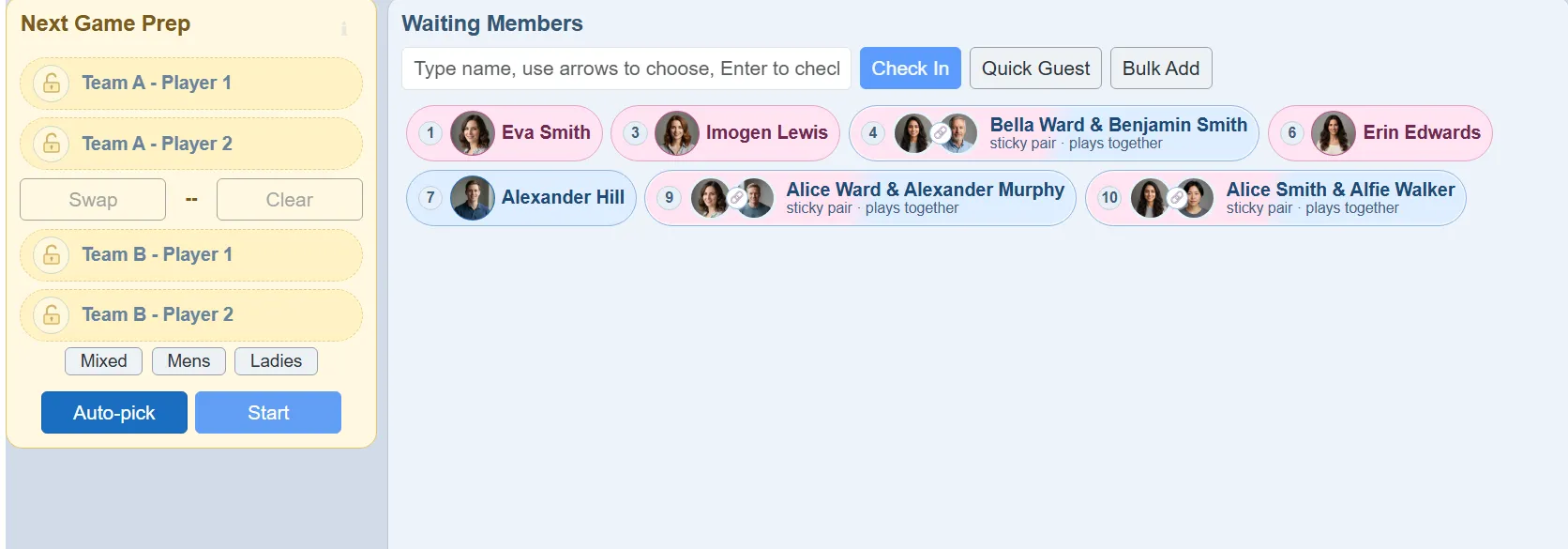 A sticky pair appears as one combined chip in the queue, labelled “plays together”.
Auto-Pick
Section titled “Auto-Pick”Two toggles decide how the picker treats the waiting queue. For fully automated picking we recommend leaving both off, so the picker has maximum flexibility to build fair, balanced games. It already weighs both as soft signals, so most clubs never need to override.
They are there for clubs that want to keep an existing house policy in place until the picker has earned their trust. Turn one on and that policy becomes a hard rule the picker cannot break.
- Force include first queue player. When on, whoever has waited longest goes into each game the picker suggests, and the rest of the game is built around them. It is a starting point rather than a lock: you can still take them out of a particular game yourself, and the next suggestion will not put them back.
- Limit to first N players in queue. When on, the picker only considers the front N of the queue for the next game, rather than the whole queue.
When someone builds a game by hand that breaks one of these rules, what happens is set separately, in the profile’s Kiosk mode block - Warn but allow (a nudge) or Block it. See Kiosk mode.
How it decides
Section titled “How it decides”You do not need any of this to run a night - but if you want to know what is going on under the suggestion, here is what the picker weighs. It balances seven things at once and picks the combination that scores best overall. None of them is absolute on its own; they are soft signals balanced against each other. The two Auto-Pick settings above are the only way to turn a preference about the queue into a hard rule.
- Expected closeness. Will this be a competitive game or a blowout?
- Skill balance. Is the skill range across the four players reasonable?
- Wait fairness. Have any of these players been waiting too long?
- Gender balance. If you run mixed games, does the team composition reflect that?
- Avoid recent repeats. Have these four just played each other or with each other?
- Partner / opponent variety. Are people getting mixed around through the night?
- Queue fairness. Are players going on roughly in the order they finished?
For smaller groups (six or eight mates on one court) the picker is doing partner-variety and game-balance work that is surprisingly tedious to track manually past an hour of play. For a larger club it is the difference between an organised night and a queue argument.