
Sessions
A session is one club night (or one event). You create it, run your games on it, and end it when the night is done. Everything that happens - games, attendance, payments, rating changes - is recorded against that session and kept.
This page is reference. For a walkthrough of running one, see Run your first club night.
How the Sessions page is laid out
Section titled “How the Sessions page is laid out”The Sessions page is a Today card with three tabs beneath it:
- Today - always visible, never behind a tab: the session running now, or one due later today. Its Start, Open, Edit, Mark full and Delete actions are right there. With nothing due it reads Nothing running right now. Today’s session will appear here when it’s due.
- Upcoming - your future nights as compact one-line rows, with a count on the tab label. This is also where you add a one-off session.
- Completed - ended sessions. Their games, stats and payments are preserved and read-only.
- Schedule - where you set up a weekly schedule so ePegboard adds each week’s session for you.
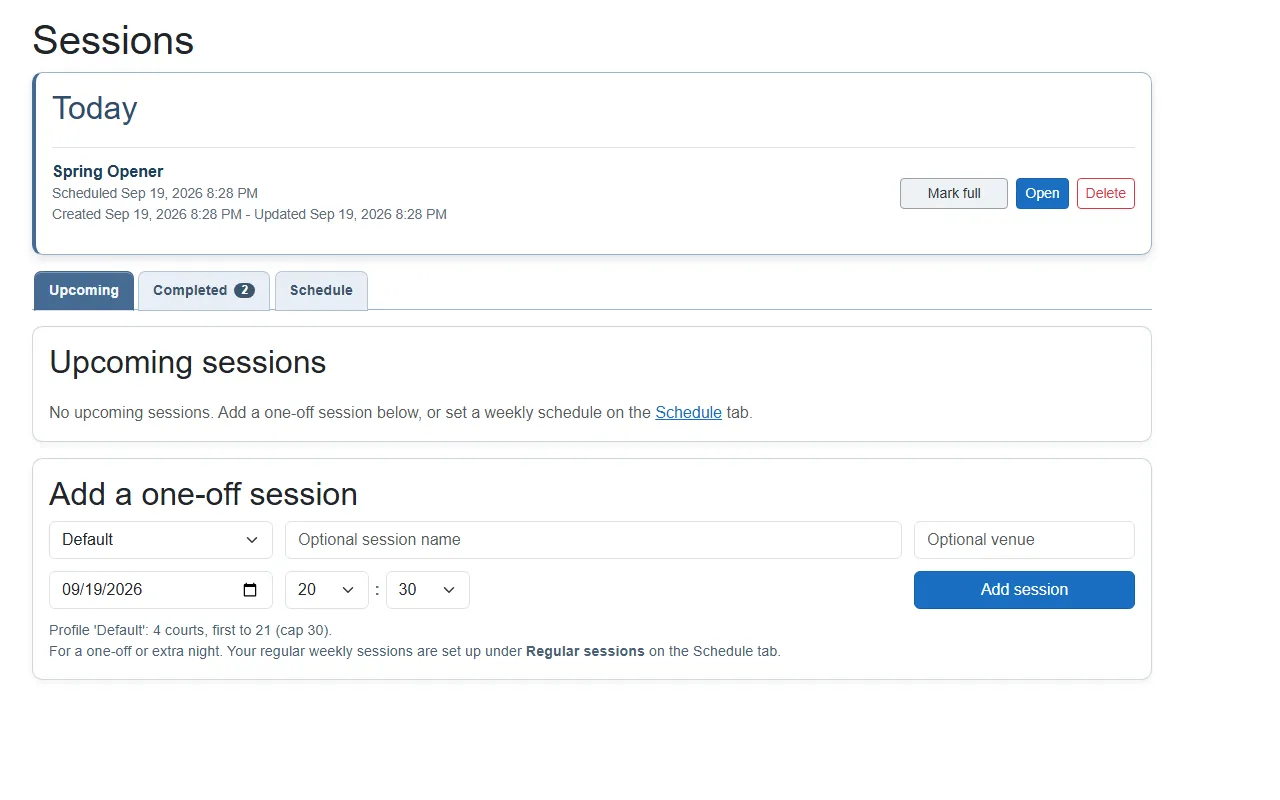 The Today card offers the actions that suit its session’s state; this one is already open, so Start and Edit are not shown.
Each row shows the session’s name, its profile, venue, scheduled date and time (if set), and when it was created and last updated. A night added by a weekly schedule carries a small from schedule tag. Scheduling and capacity covers the Upcoming and Schedule tabs in full.
Creating a session
Section titled “Creating a session”Go to the Upcoming tab and use the Add a one-off session form below the list. Fill it in and choose Add session:
- Pick a profile. This sets the courts, scoring, pricing and picking for the night. If you have not set yours up yet, see Set up your session profiles.
- (Optional) name it and set a venue. A session name (up to 80 characters) labels this specific night; leave it blank to use the profile name. Venue is up to 120 characters.
- (Optional) set the date and time. Defaults to now. You can set it in the future to prepare a session in advance. If you play the same night every week, set up a weekly schedule instead and ePegboard adds each week’s session for you - this form is then just for one-off or extra nights.
- Choose Add session. The session is created as a draft. It is not running yet - you Start it when the night begins (see Starting a session). A night due today appears in the Today card; a later one lands on the Upcoming tab.
| Field | Required | Notes |
|---|---|---|
| Profile | Yes | A saved set of defaults for the session (courts, scoring, pricing and so on). See Set up your session profiles. |
| Session name | No | A label for this specific session (up to 80 characters). Leave it blank to fall back to the profile name. |
| Venue | No | Where it is being played (up to 120 characters). |
| Scheduled date and time | No | When it starts. Can be set in the future, so you can prepare sessions in advance. |
You can have more than one session in flight at once - useful if you prepare several nights ahead, or run parallel halls. When you add another while one is already live, ePegboard checks first (“Start another session?”) so you do not open one by accident.
What the board header shows
Section titled “What the board header shows”The session board header reads as date and time | venue | name, with any empty parts left out. The name shown is your session name if you set one, otherwise the profile name - so a header ending in ”| Default” just means the session is using a profile your club named “Default”.
Starting a session
Section titled “Starting a session”Starting a session opens the session board straight away - that is where you run the night. On a shared tablet, turn on full screen to clear the clutter, or switch to kiosk mode to hand the tablet to players safely. Only owners and admins can start a session; players can view but not run it.
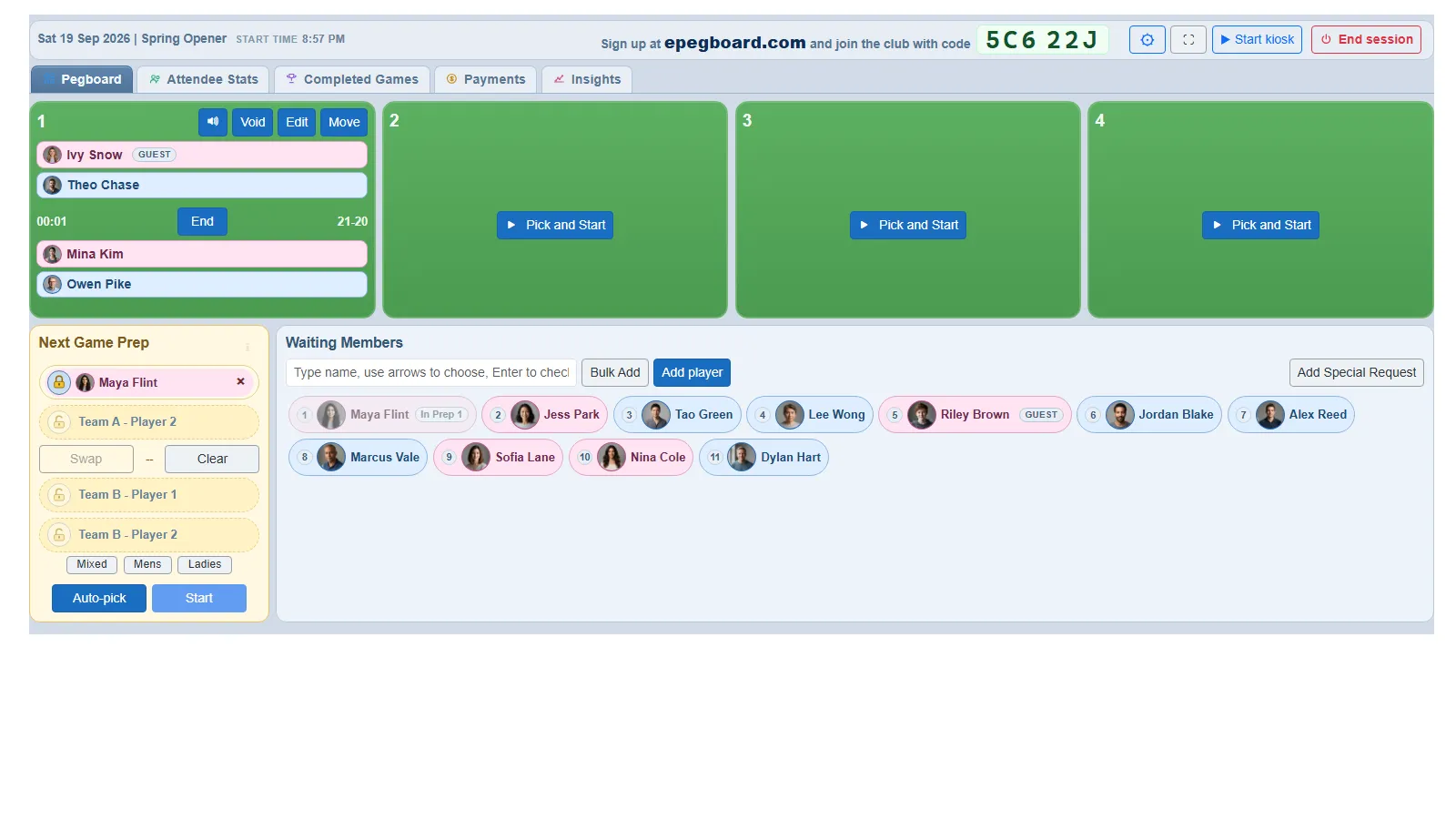 The session board. The tabs run along the top; the settings cog and End session button are top-right.
The session board tabs
Section titled “The session board tabs”- Pegboard - the live board: courts, the waiting queue, the next-game prep panel and score entry. This is where you run play, including moving a game to another court. (It closes when the session ends.)
- Attendee Stats - who is in, check-in times, court-time share, win rates and rating changes for the night.
- Completed Games - the full log of games played, with lineups and scores. A Search by player name box filters the list to games involving a given player - handy on a long night.
- Payments - per-attendee cost for the night, and what is paid or outstanding.
Some clubs also see an Insights tab (deeper performance analytics) where it is enabled.
Session settings
Section titled “Session settings”The settings cog (top-right of the board) opens that session’s settings - the same groups as a saved profile, but scoped to this night. They are per-session - changing them affects this session only, not your saved profile. The panel opens on a section list and shows one section at a time; pick the section you want rather than scrolling for it. You can set:
- Courts - the list of courts you are playing on, one row each, with a name you can tap to change and a tick for whether it is in use. + Add a court adds another. The list is the count, so there is no separate number to keep in step. Untick a court to take it out of play for the rest of the night; if a game is on it, the court finishes that game first. Courts can only be removed on the profile page, not here - see Set up your session profiles.
- Prep panels (1, 2 or 3) - how many games you stage ahead
- How the leaderboard ranks (win % or rating change)
- Scoring: game-over score and maximum score
- Score entry: the side panel (default) or a popup when a game finishes - see Entering scores
- Pricing: full member, trial and guest costs
- Sticky pairs (players to keep partnered this session) - see Sticky pairs
- Auto-Pick rules, and the Kiosk mode block - what players can see and change on a shared tablet, and how strictly picking rules are enforced (see Kiosk mode)
To change the defaults every new session starts from, edit the profile instead - see Set up your session profiles. For what the picking-related settings do and how to tune them for your club, see The game picker. Only owners and admins can change session settings.
Ending a session
Section titled “Ending a session”End session (top-right) closes the night. When you end a session:
- Anyone still checked in is checked out automatically, timestamped at the end.
- All games, attendance, payments and rating changes are saved, and the session moves to the Completed tab as read-only.
- The live Pegboard closes; the stats, games and payments remain available to view.
- You can leave an optional star rating and comment on how the night went. It is never required.
Ending is final - an ended session cannot be reopened, so end it only when the night is genuinely done. Only owners and admins can end a session.
Who can do what
Section titled “Who can do what”| Action | Owner | Admin | Player |
|---|---|---|---|
| View sessions, stats and history | Yes | Yes | Yes |
| Create, start, run and end sessions | Yes | Yes | No |
| Change session settings | Yes | Yes | No |
See Run your first club night to put it together, Scheduling and capacity to add sessions automatically each week and show your forward schedule publicly, or The game picker for how games are chosen.