
Run your first club night
This walks you through running a real club night on ePegboard, start to finish. By the end you will have started a session, signed players in, played games the picker chose for you, recorded scores, and closed the night with everything saved.
You do not need to set anything up first. You can add players as they arrive, so an empty roster is fine - this guide assumes you have just signed up and have a few players in mind.
Before you start
Section titled “Before you start”- You are signed in at play.epegboard.com.
- You have a tablet or laptop at the desk - a screen people can gather around. (Players can use their own phones to check their stats later.)
- You are on the Sessions page.
Step 1: Start the session
Section titled “Step 1: Start the session”A session you prepared earlier is waiting in the Today card at the top of the Sessions page - tap Start on it. Nothing there? Add one on the Upcoming tab with Add a one-off session, and it appears in Today ready to start.
That is the one tap that opens the night - you now have a live board ready for players.
The board is empty for now. That is expected; we will fill it as people arrive.
Step 2: Check players in as they arrive
Section titled “Step 2: Check players in as they arrive”As each player turns up, tap their name to add them to the waiting queue. New to your club? Add them on the spot and they are in the queue too.
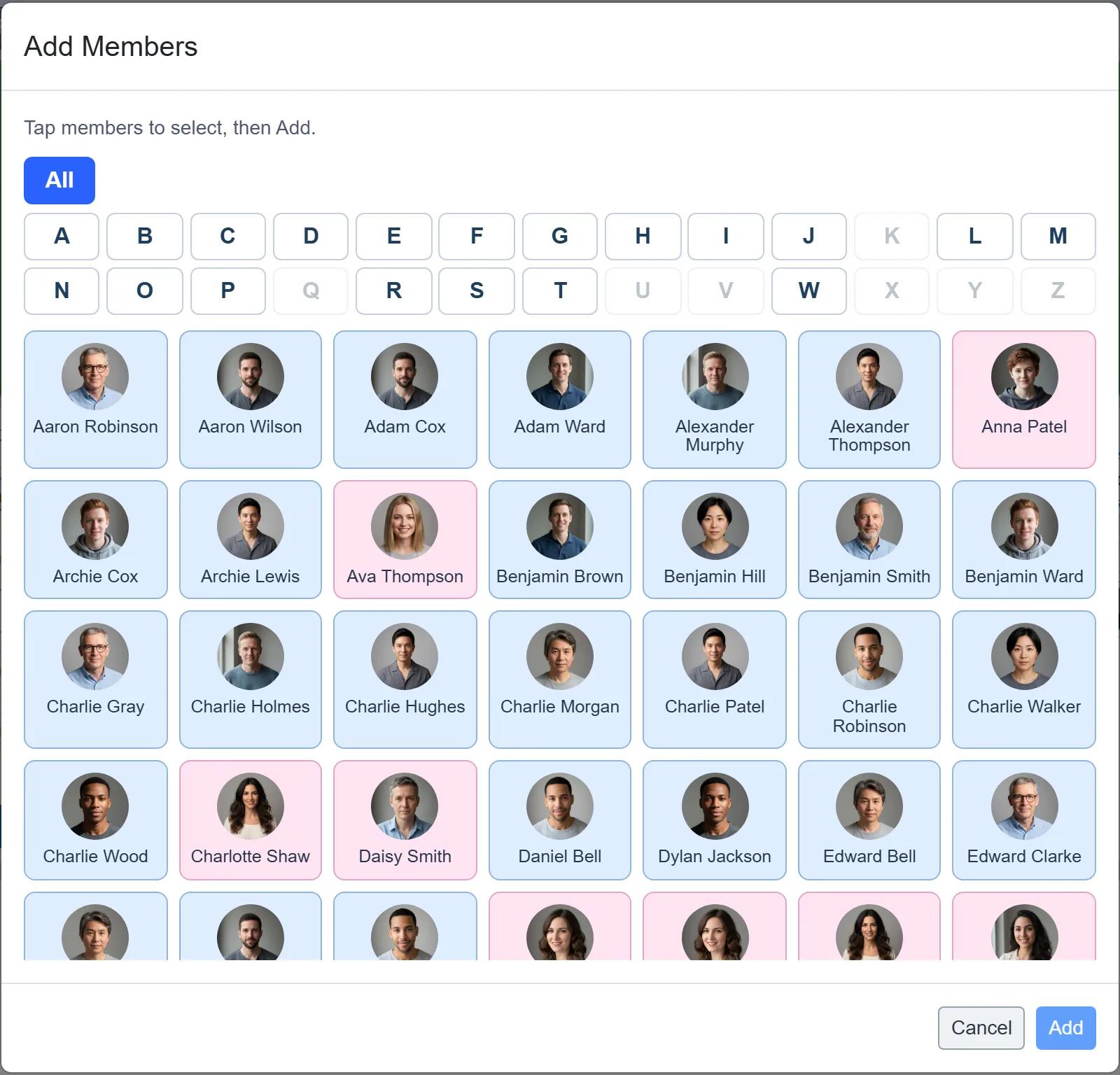
Add a handful of players to begin with - you need at least four to make a game. Do not wait for everyone; you can keep checking people in all night, and the picker will fold them in.
Step 3: Generate your first game
Section titled “Step 3: Generate your first game”There are two ways to get a game on court, and the difference is simply whether you look at it first.
Straight on: tap Pick and Start on a free court. The picker chooses four players from the queue and the game goes on there and then - there is nothing to review and nothing else to press.
Or see it first: use the Next Game Prep panel beside the queue and tap Auto-pick. The picker fills the four in there and leaves them for you to look at, change, and start when you are ready.
Either way it is choosing for balance and fairness, not at random - it weighs how close the game will be, who has been waiting longest, who has played whom, and a few other things. You do not have to do anything with that; just know the suggestion is considered.
If you want different players, tap a player’s name to swap someone else in, or use the Swap button. The picker re-checks the game as you do and will flag a swap that creates a serious mismatch, but it will never stop you - you are in charge.
Step 4: Start the game
Section titled “Step 4: Start the game”Happy with the four players? Tap Start on the prep panel. They move out of the queue and onto the court, and the board shows the game as live.
While a game is made up and waiting in the panel, the free courts read Start rather than Pick and Start - tapping one puts that prepared game on that court.
Now repeat Step 3 on your other free courts until every court is busy. With more than one court running, the picker still knows the whole room, so it will not strand someone who is needed elsewhere.
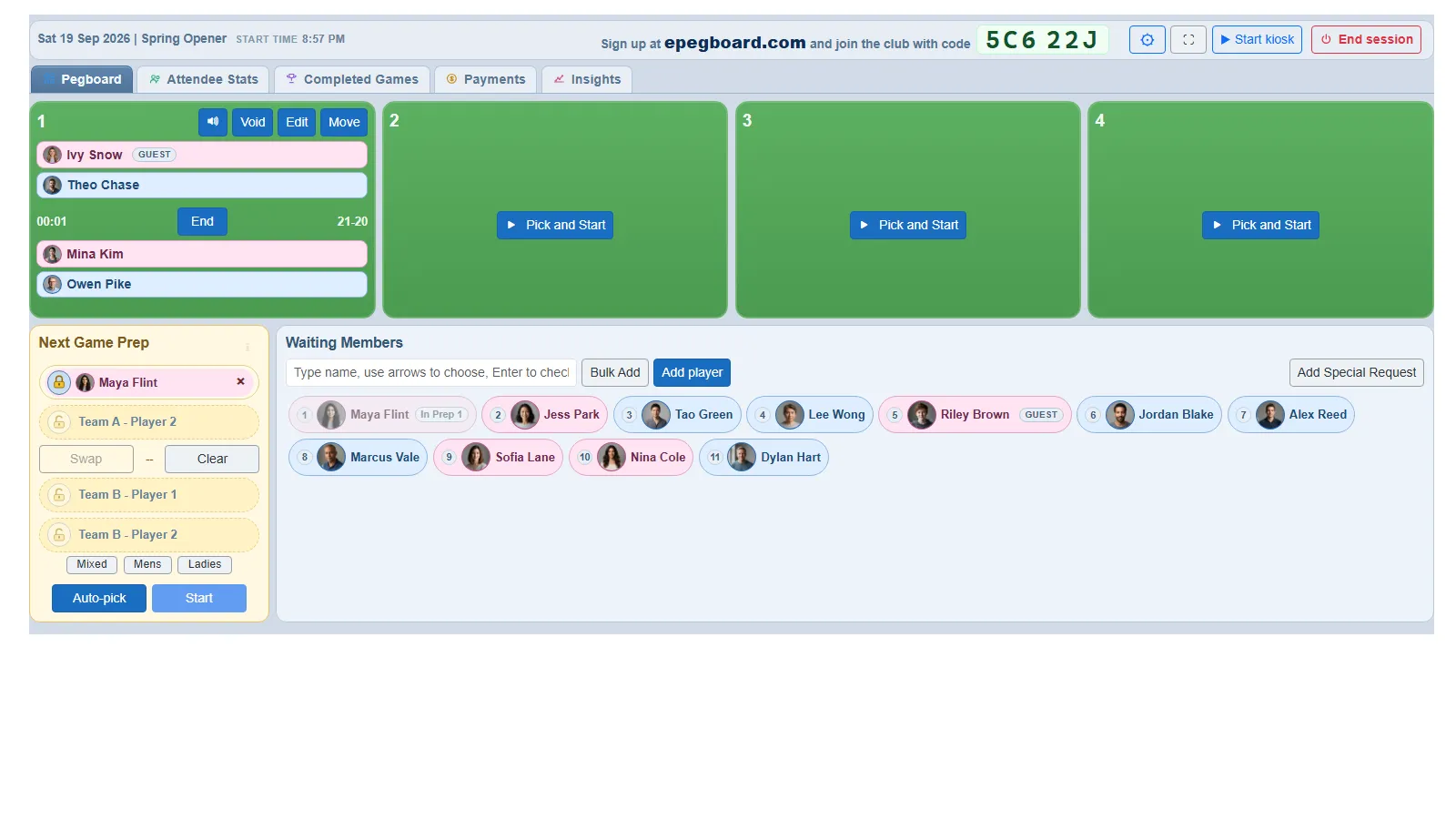 The session board. A live game on court 1, free courts ready to pick, the next-game panel on the left and the waiting queue filling the rest.
Step 5: Record the score when the game ends
Section titled “Step 5: Record the score when the game ends”When a game finishes, record the score. The four players go back into the queue (or sit out for a breather if you have that set), ready to be picked again.
Recording the score is what feeds the ratings - the system updates every player’s rating from the result before they go back in the queue, so the next games stay competitive.
Step 6: Keep the night moving
Section titled “Step 6: Keep the night moving”That is the whole loop: a court frees up, you generate the next game, you start it, you record the score. The board always shows you live games, the waiting queue, and who is sitting out.
Things move around on a real night, and you can move with them. If a court goes out of action, Move on the court card sends its game somewhere else - and if no court is free, it will offer to swap with the game on another court. If a court is out for the evening, untick it in the session settings and the picker stops using it.
Every device signed in to the session sees the same board update live - the desk tablet and your phone, for instance.
Step 7: End the session
Section titled “Step 7: End the session”When the night is done, end the session. Everything is saved permanently:
- every game’s lineup and score,
- attendance and any payments,
- each player’s rating change for the night.
That is it - you have run a club night on ePegboard.
What you have now
Section titled “What you have now”Your members carry their history forward. From here you can look at:
- the completed games log for the night,
- per-player stats (games, wins, win %, rating change),
- each member’s full history and rating progression over time.
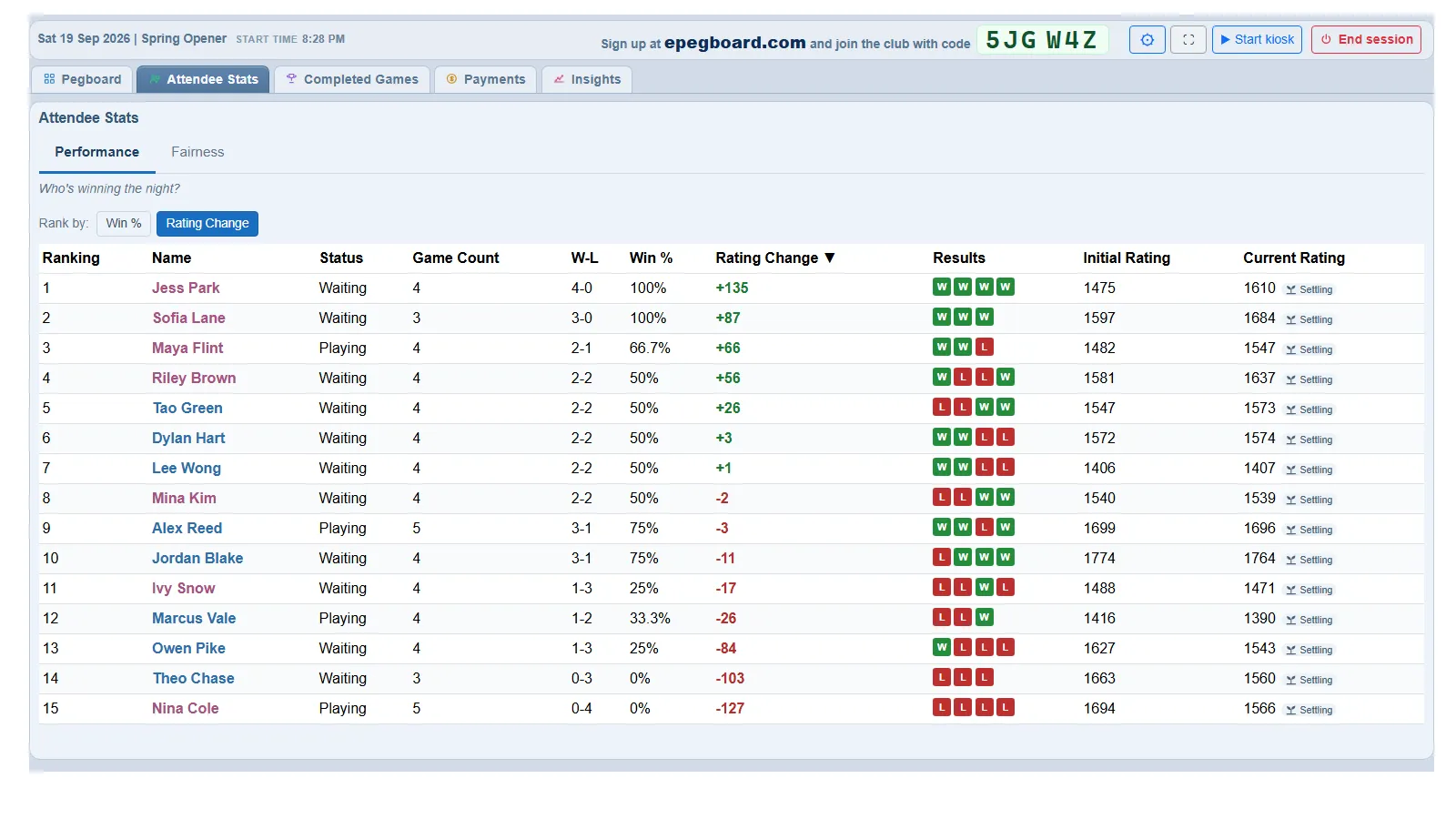 The Attendee Stats view during a session: who is winning the night, and how each player’s rating has moved.
- Roll out ePegboard to your club - how to introduce it to your club so it takes hold and your players engage with it.
- The game picker - how games get chosen, and the settings you can tune for your club.
- How ratings work - what the numbers mean and how they move.
- Import your roster - load your existing members in one go instead of adding them by hand.